Saturday, June 8, 2013

Focus on RMH Avon

I Saw the Figure 5 ... really close up!


Currently on exhibit at the Panorama Gallery is the Photography of RMH Avon. Mostly finely detailed studies of nature (Hope you don't mind spiders! Me, I think they're beautiful ... as long as they're outside) and man-made objects, they bring Real Life (What's that?) into sharp focus.

Be sure to visit!

Om Help Me! I'm a Trompe Loeil Addict!


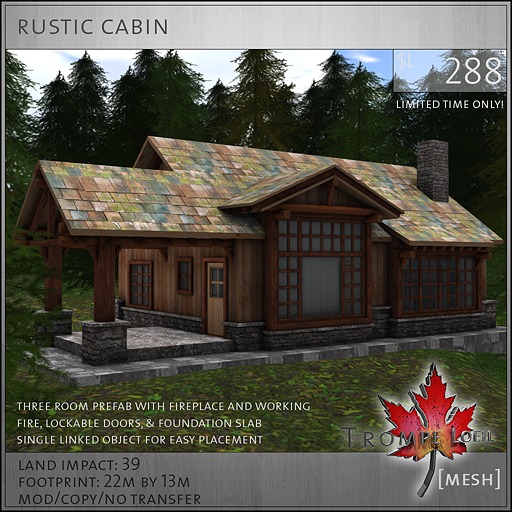
I've bullied and cajoled; I've threatened them. Nothing stops Trompe Loeil from issuing the sweetest little houses at prices I'm willing to pay. Now I will spend the rest of the next few days staring at a map of the Collabor88 sim looking for the "49" that signals an opening. Lludmila will be there - minus prims and scripts - to swim upstream through the lag to mate with the POS (that's POS in the "good" sense of sales as opposed to the Ford POS).

And, as usual, she will have nowhere to put it.


 rustic cabin sales image L288

Sunday, May 26, 2013

Virtually Dreaming

Brown Cottage Chair set from the Lucky Chair.


Kathy dropped by Dreamland Designs just to take a gander, and went home with an inventory full of goodies. The furniture is stuffed with animations that give props when necessary.


Cozy Attic Chair set - FREE!


Lazy Days Beach Chair - 10L (just outside main door).


 While gathering information for this post, Kathy forgot which one was free and which was Lucky Chair, etc., so she scurried back and realized she missed the Sweet Candy Vintage Chaise for 10L.


Sweet Candy Vintage Chaise (just inside door), also 10L!

Rustic Blue Plaids Bedroom Set - alternate in the Lucky Chair.
"Where did all my clothes go?"

Plenty of naughty anims in the bedroom set, but also some
tame ones. Perhaps Kathy is reading a naughty book.


There's a Midnight Mania and a Mini-Mania board, so if you're persistent, you can really load up on some nice furniture. Oh, and I guess you could also buy some full price. Huh! Who'd do that? Oh, right - me.

Dreamland Designs

Wednesday, May 15, 2013

A Little Beach House


Heh! Polynesian Gothic design!


Available at her shop, Anarya Design inworld, or on the Marketplace, Anarya has a free beach house fully furnished (205 prims) with a pool!
We just can't resist another house!

Saturday, May 4, 2013

Every Day In Every Way ...

Adjusting the orientation with Edit.

It's been less than a year that I bought that Animare pose maker on a whim. I love taking photos and had collected quite a few poses, mostly freebies, but some purchased. I bravely waded into the pose making, knowing no more than what the instructions were and having no idea what to make until I recalled my obsession with the Classical Ages of ancient Greece and Rome and decided to make some poses from statuary.


Okay, they were a bit rubbishy because I hadn't set all the points, so the head or the whole trunk of the body would shift around while the arms and legs stayed put. Or sometimes the whole avatar would slip a little sideways. I wanted to correct this, but I didn't want to have to remake each pose. Instead, I put the poses into poseballs and set them out in a box as freebies.

Then last weekend I was looking at my collection (saved as .bvh files in a folder in my documents) and noticed that in the beginning I had written down all the numbers for each joint. I wondered if I could compare that to the series of numbers in the .bvh files and decode them.

If I could do that, I could just edit the .bvh file and upload that. So I copied the numbers from the .bvh files and pasted them at the bottom of the corresponding notes and printed them off. At last I could see what I had done wrong and hoped to be able to correct it.

The first set of three numbers (after the set of three "0.000001") was the Hip. In order for the avatar to hold still during the pose, the three 0s had to be changed to 0.1. This sets that point. Using the HUD it would just be moving one bit of that joint and then moving it back. It still says 0 0 0 on the HUD, but it reads 0.1 0.1 0.1 when saved to a .bvh file.

Now, unfortunately, the three numbers are not in the same order in Animare as they are in the .bvh file. So I had to puzzle that out as well. Once all the mistakes were corrected, I was able to take some final photos of various avs in position (as well as quickly making a fig leaf for modesty ... which I decided to include with the poses), make a Point Of Sale sign and  upload it all to my marketplace shop.


If anyone follows after me in my clumsy footsteps, here are the body parts in order along with the Animare positions corresponding with those in the final .bvh file. The numbers reflect the order that they appear in the Animare HUD.

Mystery ##     0.000001; 0.000001; 0.000001
Hip                  forth/back; side; turn
Abdomen         forth/back; side; turn
Chest               forth/back; side; turn
Neck               forth/back; side; turn
Head               forth/back; side; turn

Left Collar       forth/back; up/down; turn
Left Shoulder   up/down; forth/back; turn
Left Elbow      forth/back; up/down; turn
Left Wrist       up/down; forth/back; turn

Right Collar     forth/back; up/down; turn
Right Shoulder up/down; forth/back; turn
Right Elbow     forth/back; up/down; turn
Right Wrist      up/down; forth/back; turn

Left Hip           forth/back; in/out; turn
Left Knee        forth/back; in/out; turn
Left Ankle       up/down; turn; to side

Right Hip         forth/back; in/out; turn
Right Knee      forth/back; in/out; turn
Right Ankle     up/down; turn; to side

Once you know where you've gone wrong, you can probably easily fix it on the fly. When you upload (and I love Firestorm for this because you see the pose on your av and not on a dummy in a little window), wiggle your cursor around to make sure you are locked in place (where you want to be - some poses might just be upper body or an arm) and if there's a wiggle where you don't want it or some odd tilt to the whole av you didn't expect, you can just open the .bvh file, adjust, and upload it again. And keep doing that until it behaves.

More information at the Animare website - although I warn you that there isn't much, mostly because this is a very easy program to use.

Tuesday, April 16, 2013

A Dedicated Multi-media Exhibit of Fashion

Give it time to load ...


The latest exhibit at the Paris Metro Gallery is a multi-media exhibit by Fuschia Nightfire called "Paris Fashion." Surfaces of the interior of the gallery as well as monitors come alive with a machinima of a fashion show.  The music video is fairly brief and repeats. Be sure you have your media setting turned on. The exhibit  appears throughout the gallery, so you can go to a different area and see from a different angle.

And of course there is the
commemorative gown ... also with
a moving pattern on the mesh portion.

Saturday, April 13, 2013

Spring Has Come ...

New item is on the leftmost lucky board.


... to the +9 mainstore. It's such a pretty little island in the sky just to visit, but there's also something new in the non-group lucky board. You have to be quick, though, because all the boards are set to one minute. You snooze, you lose. There would be a photo of the new item, but SL turned into Crashopolis for no apparent reason. I can understand how it might get annoyed with me camming around like crazy, but it stood still for that and crashed instead right after delivery of the lucky board prize. The "box" is now hanging in midair in my skybox and, honestly, I've had enough crashing for this morning.

Instead, here are some more photos of the mainstore:


Such a lovely, peaceful place.